Drafts and answers, ready for your team to review.
Describe what you need or start a ready-made task, and Kiro AI prepares editable campaigns, journeys, segments and signup forms, and answers questions about your results. Your team reviews the work and decides what goes live.
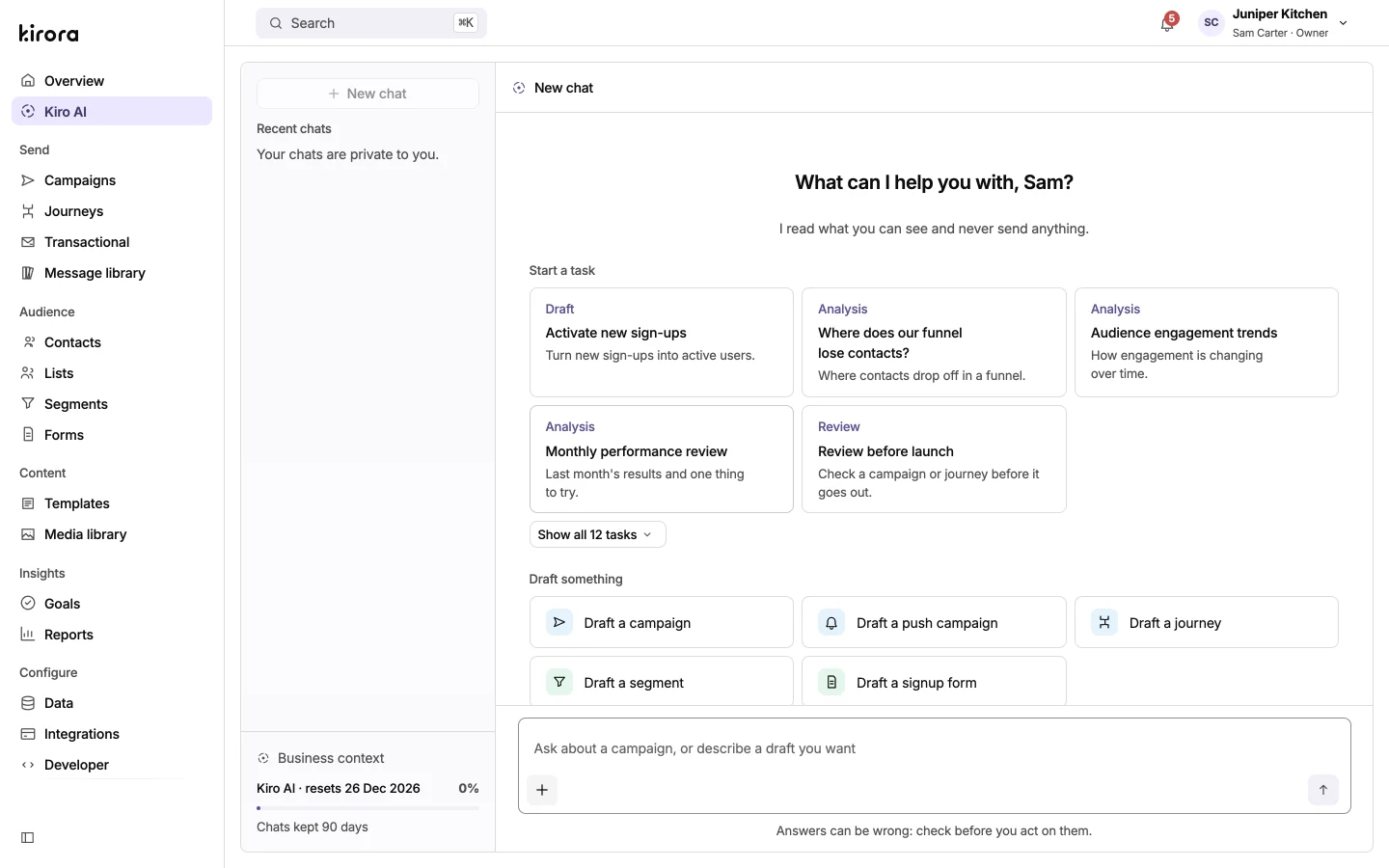
Editable drafts, opened in the right editor.
Describe what you need and Kiro AI prepares a draft for your team to edit and review.
Five kinds of draft: draft email and push campaigns, journeys, segments and signup forms in their editors.
Questions before assumptions: clarify vague requests first and begin bigger drafts with an editable plan.
Drafts from your templates: write the words into your own templates, brand templates or gallery templates; layout and photos stay as designed.
Ready-made tasks that return work to review.
Start a task from the gallery and get an analysis, a review, setup steps or a draft, filled in from your own data.
Understand your customers: find valuable or at-risk customers, follow engagement trends and locate funnel drop-offs.
Re-engage quiet contacts: find contacts who stopped clicking; draft a segment and email asking about continued interest.
Review a segment: Review rules, membership, data gaps and usage, with one suggested fix.
Your team decides what goes out.
AI prepares the draft. Your team decides what goes live.
People send, schedule and activate: draft only; sending, scheduling, activation, subscription changes and suppression remain with people.
Bring your own AI assistant: connect an assistant through MCP with a restricted key; its campaigns and journeys wait for human approval before sending or activation.
Workspace-wide off switch: admins can turn AI off for the whole workspace.
Additional features
A first plan
“Get started” proposes goals and setup steps for a new workspace.
Review before launch
check a campaign or journey before it goes out: who it reaches, goals, tests, claims and links.
The right tasks for your business
Get relevant tasks using your events and the segment you start from.
Ask for a change
Request edits to the whole email or a single block.
See every change
Review copy, structure or styling changes and keep or revert them.
Plain-language questions
Ask about campaign conversions, click trends or journey results.
Answers that show their working
Check the campaigns and figures behind each answer.
Goals it proposes
Review and save proposed goals; Kiro AI uses goals when drafting.
Your brand, imported
Import website branding and set your business, audience and tone.
Approved terms and banned claims
List approved terms and banned claims. Kiro AI is designed not to add a discount, price, deadline or promo code of its own, and asks when a draft needs one.
Kiro AI questions
What can Kiro AI create?
Email and push campaigns, journeys, segments and signup forms. Each email starts from a template, and each draft opens in its editor for you to check and save.
Can Kiro AI send anything on its own?
No. Sending, scheduling and activating always wait for a person, and AI can’t change anyone’s consent or suppression.
Will it make up offers or facts?
Kiro AI is designed not to add discounts, prices, deadlines or promo codes of its own, and to avoid the claims you’ve banned. When a draft needs a detail it doesn’t have, it asks, and you review every draft before it’s used.
What are Kiro AI tasks?
Ready-made jobs you start from a gallery, such as “Who are my best customers?” or “Re-engage quiet contacts”. Each asks a few questions, filled in from your own data, then returns an analysis, a review, setup steps or a draft for you to check. A task never sends, schedules or activates anything.
Can Kiro AI set goals for me?
Kiro AI can propose a goal from your own events and results: what it measures, why, and a target if you gave it a number. A person reviews it and saves it, then can change its name, owner and target; Kiro AI never saves a goal itself.
Can I use Claude or Cursor instead?
Yes. Connect them through the MCP server with a restricted agent key. They can read and draft, and their work waits for a person to review.
Which plans include Kiro AI?
Kiro AI drafting, edits, answers and tasks are available on Starter and above, within a monthly allowance shared by the workspaces you own; the pricing page shows how much each plan includes. On Free, Kiro AI suggests your brand profile from your verified domain and imports your brand’s look from your website, up to five times per workspace.
What happens when the allowance runs out?
Kiro AI stops until next month and everything else keeps working. The owner can choose to let it continue from the prepaid balance instead; there’s never an AI charge without that choice. Owners and admins are told at 75% and 90%, and when it runs out.
Resources to get started. Guides and pages that go further.
What Kiro AI can do
Draft campaigns and journeys, start tasks, edit messages, propose goals and ask about workspace results with Kiro AI.
How Kiro AI tasks work
Start a ready-made task, answer a few questions and get an analysis, a review, setup steps or a draft back to check.
Connect Claude, Cursor or another AI assistant
Connect an MCP-compatible assistant with an agent key, then review its drafts in Kirora.
Journeys
Draft a journey from a description.
Goals
The targets Kiro AI proposes and plans around.
MCP server and CLI
Bring your own agent.
Start from a draft, not a blank page.
Create a workspace and describe the campaign, journey or audience you need. Kiro AI prepares an editable draft; your team reviews it and decides what goes live.
See our Acceptable Use Policy, Terms and Privacy Policy.