Design branded emails without writing HTML.
Start from a template or build with drag-and-drop blocks. Personalise content, apply your brand kit and check every layout before you send a test.
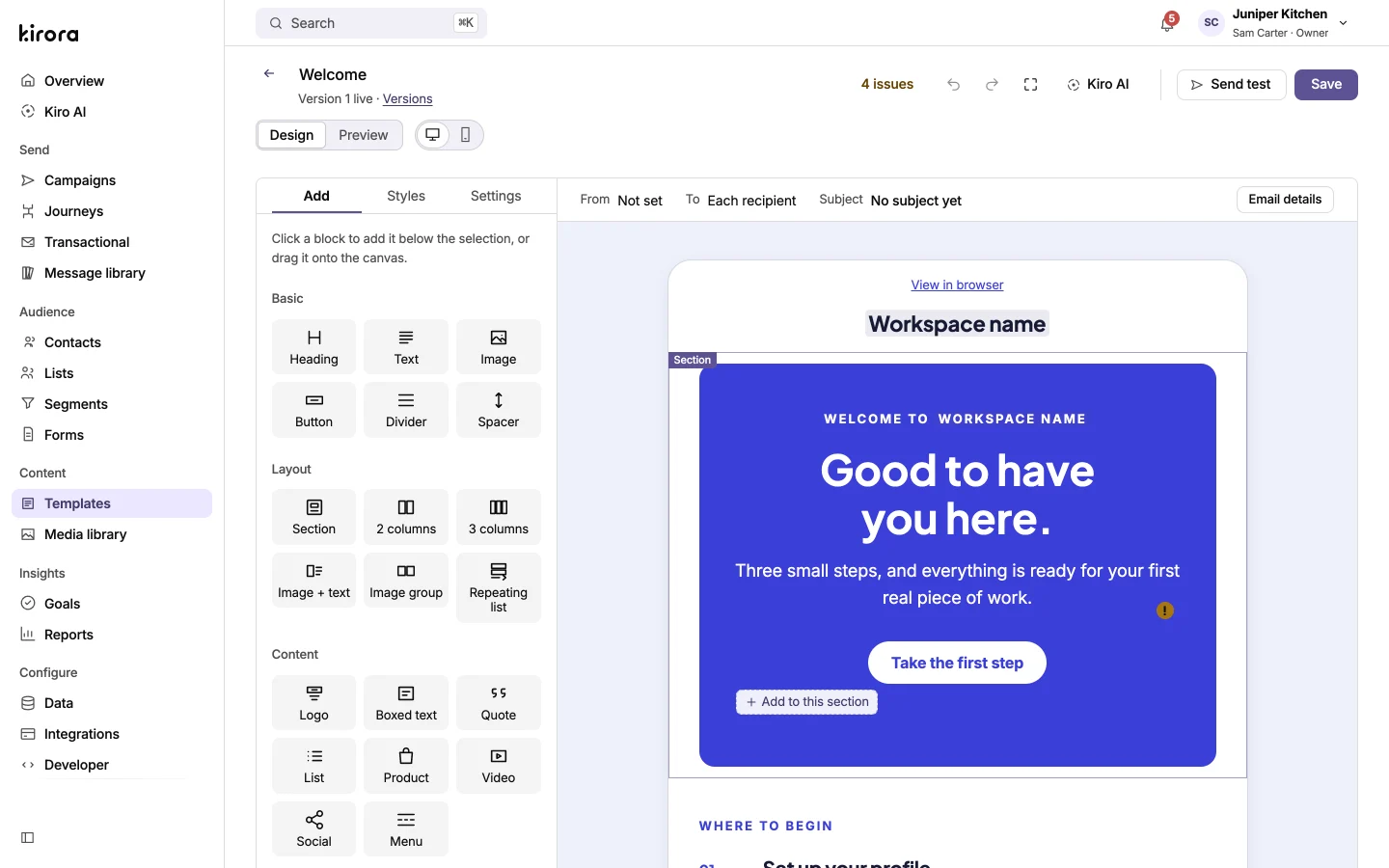
Build with blocks, not code.
Drag in the blocks each email needs, start from a template and reuse what your team has already made.
Blocks for every email: headings, text, buttons, images, image groups, products, video, social links and dividers, in two or three columns that stack on phones.
Start from a template: preview starter emails at full size before choosing.
Shared blocks: update reusable blocks once to keep future emails consistent.
Reuse your brand’s colours, fonts and layout.
Set your brand once; every design that uses it follows, in any language.
One brand kit: colours, fonts, text size, widths and spacing, with your logo and social links. Change it once and every template that uses it follows.
Web fonts with safe fallbacks: use web fonts with matching safe alternatives for inboxes that don’t support them.
Any language, either direction: set email languages or translations, with right-to-left layouts in the designer and inbox.
One design, a different email for each person.
Fill in each contact’s details and show the blocks that suit them.
Merge tags with fallbacks: names, plans and anything you store, with a fallback so nobody sees a blank.
Blocks shown by rule: show blocks by contact rules, device type or whether a value exists.
Repeating lists: one row per item for order lines, cart contents or recommendations.
Additional features
Media library
Upload, find and reuse images; turn video links into clickable thumbnails.
Brand defaults
Keep theme text readable; default headers and social blocks use your branding.
Prices and dates for each reader
Format numbers, prices, dates and times for each contact’s language and region.
Checks on every block
Missing subject or preheader, buttons without links, http links, images without a description (alt text) and tags without a fallback, flagged where they are.
Link checker
Every link tested, with the ones that don’t load called out.
Preview and test
Preview layouts, plain text and contact data; send tests to yourself or saved test lists.
Saved as you go
Autosave with overwrite warnings and restorable published versions.
Email designer questions
Do I need to know HTML?
No. Everything is drag and drop, with your brand’s colours and fonts. Transactional templates can also use a Custom HTML block when you need full control.
Can I preview desktop and mobile layouts?
Yes. Columns stack on small screens. You can show blocks only on desktop or mobile, and you can preview both before sending.
Can each person see different content?
Yes. Merge tags fill in each contact’s details, and blocks can show only to contacts who match a rule or only when a value exists.
Which fonts can I use?
Web-safe fonts and popular web fonts such as Inter, Montserrat, Poppins and Playfair Display. Inboxes that don’t support web fonts show a matching safe font.
Can Kiro AI help write emails?
Yes. Kiro AI improves the copy, structure or styling of the email you have open, or of one block, and you keep only what you approve. When it drafts a campaign, it starts from a template.
Resources to get started. Guides and pages that go further.
Design an email
Arrange blocks, apply your brand kit and preview an email before sending a test.
Merge tags and personalisation
Personalise emails with contact details and set fallbacks for missing values.
Campaigns
Send the email to all contacts, lists or a segment.
Email templates
Start from a ready-made design.
Kiro AI
Draft campaigns and refine emails.
Embed the designer
The React SDK, in preview for partner accounts.
Design your first branded email.
Create a free workspace, set your brand kit once and start from a template in the drag-and-drop designer. Send yourself a test before it goes to anyone.
See our Acceptable Use Policy, Terms and Privacy Policy.