Automate welcome messages, reminders and follow-ups.
Automate follow-ups around customer activity and dates. Use waits, branches and exit rules to define each person’s path.
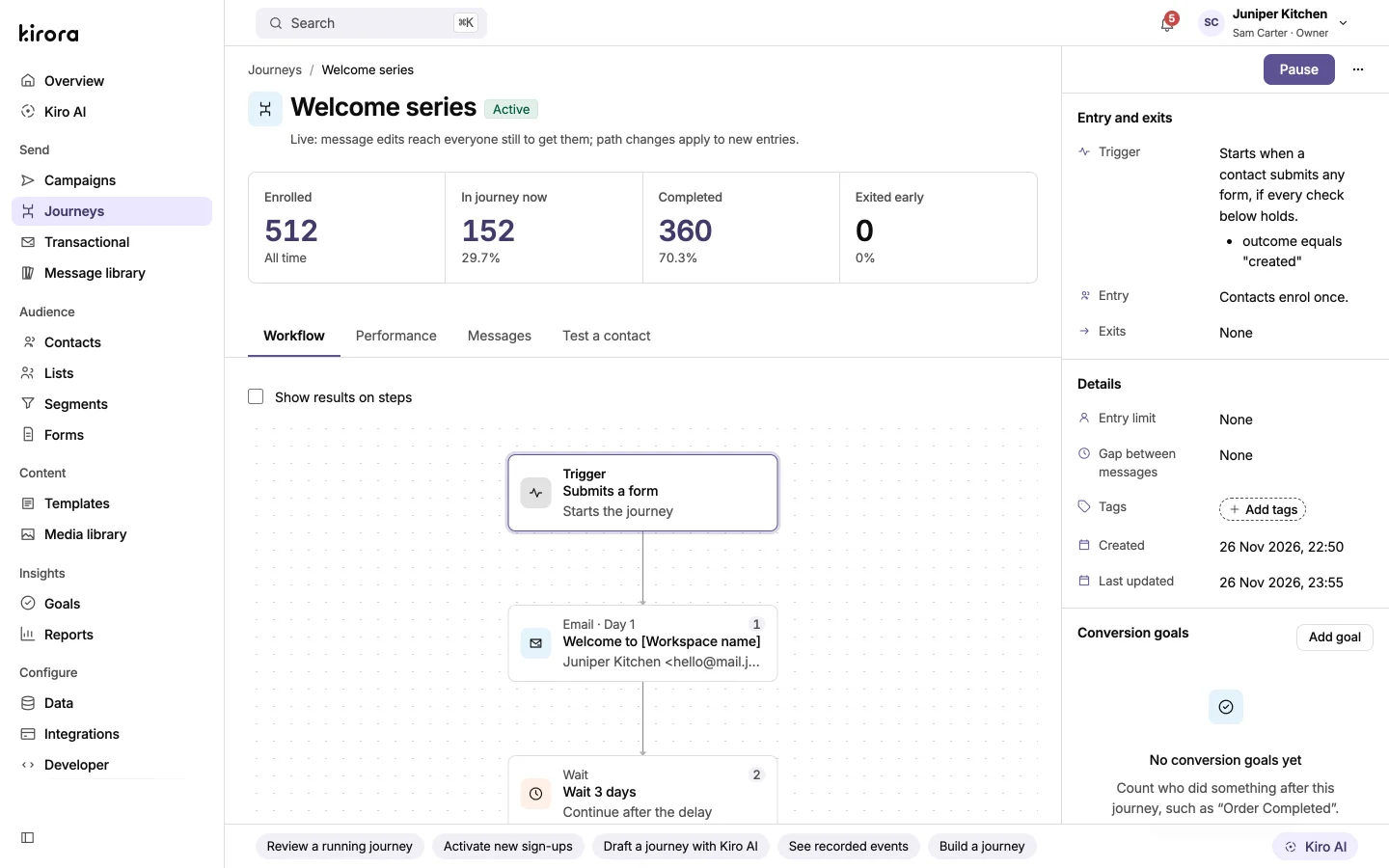
Start from events, dates and audience changes.
Each journey begins at the moment that matters, and only for the people it should reach.
Events, with entry conditions: start from app or store events that match your conditions.
Forms, lists, segments and attributes: start on form submissions, list joins, segment entry or departure, or chosen attribute changes.
Dates: repeat annually or once, before or after dates, with local timing and leap-day rules.
Build the path each customer needs.
Wait, branch and act on what each customer does, so every contact gets the next step that fits.
Flexible waits: wait by duration, working days, dates or activity; follow “Did it” or “Timed out”.
Branches, filters and splits: branch on event data, filter contacts or split by rules with an “Otherwise” path.
Digest: collect repeat events for up to 7 days, then send them in one message.
Test before launch, and edit safely while live.
Check a real contact’s path before launch, stop steps once the goal is met, and fix messages without stranding anyone.
Exits: stop future steps when an event happens, someone leaves a segment or reaches the conversion goal, even mid-wait. A message already sent or on its way isn’t recalled.
Test a contact’s path: check entry, steps and message eligibility for a real contact, without sending anything.
Safe edits to a live journey: message fixes reach remaining recipients; path changes apply to new entrants.
Ready-made journeys for common moments.
Choose a starting flow, connect the required data, edit the messages and test it before activation.
Welcome series
Send three emails over a week after a form signup.
Form follow-up
Send a personal reply the day after a form submission.
Abandoned checkout
Two reminders with their items, starting 4 hours after checkout begins; an order ends it.
Abandoned cart
Show the product again 4 hours later; checkout or an order ends it.
Browse abandonment
Show a viewed product an hour later; a cart, checkout or order ends it.
Review request
Ask for a review 14 days after an order, once delivered; a refund or cancellation ends it.
Post-purchase cross-sell
Share best sellers a month later; a refund or cancellation ends it.
Win-back
Invite customers back 90 days after their last order, then two weeks later if they still haven’t ordered.
Re-engagement
Ask quiet contacts if they still want your emails; follow up a week later only if they haven’t opened or clicked.
Birthday
Send annually at 9:00 in the contact’s time zone.
Trial ending
Remind a week and a day before a trial ends; a payment ends it.
Additional features
Enrol existing members
Enrol existing list or segment members anytime, skipping those already enrolled.
Sending hours
Continue only within your chosen hours in each contact’s time zone.
Actions and webhooks
Change attributes, list memberships or list-attribute items, or call your webhook.
Reachability fallback
Choose another step when app access, consent or topic membership is missing.
A path when a message can’t be sent
Give contacts a separate path when a message can’t be sent.
Transactional steps
Mark an email or push step as transactional for a receipt, reminder or alert they need. It goes without marketing consent, quiet hours or message limits. For email, only addresses that bounced, or marked transactional email as spam, are skipped.
Consent checked by default
Marketing steps check consent, topics and suppression first, and follow your quiet hours and message limits when you turn them on.
Re-entry and limits
Control repeat entries, cooldowns and total entries; “Full” marks the cap.
Step-by-step results
See step counts, exits and message results, including on the canvas.
Conversion goals and revenue
Track conversions and attributed revenue within your chosen goal and window.
Random split and holdout
Compare 2–5 random paths’ conversion rates against holdouts in percentage points.
Follow one contact
See each person’s route and who’s waiting at each step.
Journey questions
What can start a journey?
An event from your app or store, a form submission, joining a list, entering or leaving a segment, an attribute changing, or a date such as a birthday or renewal.
Can people already in a list or segment enter its journey?
Yes. When you activate a journey that starts on a list or segment, tick Also enrol the people already in it. On a live journey, choose Add people already in the list (or segment) at any time. Either way, they start at the first step over the next few minutes. Anyone the journey already has a run for is skipped, and its entry limit still applies.
Can I change a journey while it’s running?
Yes. Changes to a message reach everyone who hasn’t reached that step yet. Changes to the path apply to people who enter from now on, while people already in it finish the version they started.
What happens if someone can’t receive a message?
They skip it and carry on, or go to the step you chose, such as an email instead of a push. A message that can’t be sent at all can take its own path.
Can I see what a contact would get before turning it on?
Yes. Test a contact’s path shows whether they’d enter and every step they’d reach, without sending anything.
How do I know a journey works?
Step results show where people move on or leave. Add a conversion goal to track orders and attributed revenue, and a random split with a holdout to compare conversion rates with people who got nothing.
Resources to get started. Guides and pages that go further.
How journeys work
Learn how triggers, steps, entry rules and exit events control automated customer journeys.
Build a journey
Choose a trigger, add messages and decisions, test paths and activate your journey.
Identify and track
Send the events journeys listen for.
Goals
See which journeys are credited towards your targets.
Kiro AI
Describe a journey and get a draft.
Automate your first follow-up.
Create a free workspace, start from a ready-made journey such as a welcome series, and test a real contact’s path before you turn it on.
See our Acceptable Use Policy, Terms and Privacy Policy.